Use VideoWhisper WordPress Video Presentation plugin to setup a website where tutors can run paid live video seminars, presentations, conferences, eLearning rooms.
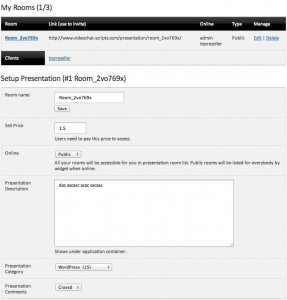
Moderators setup their rooms, prices and see subscribed clients:
Students can buy access to presentation rooms:

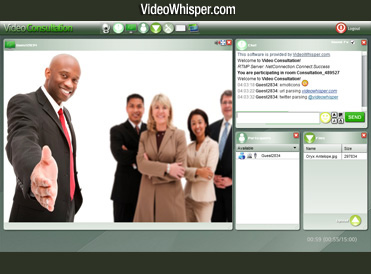
Moderators control what participant is displayed on main screen (speaker) and can also add an additional participant (inquirer) to ask questions or assist.
Participants can change their public status (i.e. request to speak), upload and download room files, text and video chat depending on setup permissions.
How to setup:
- WordPress Video Presentation plugin
- Can be used in FREE (limited) mode.
- Price: $250/purchase or $25/month rental (optional for full mode)
- Compatible Web and RTMP Hosting
- Wowza RTMP hosting required for live streaming and iOS support.
- Web hosting compatible with WordPress.
- FFMPEG and latest codecs on web host, required for transcoding.
- Recommended: VideoWhisper Wowza Hosting starting from $50/month.
- WordPRess myCRED plugin to allow students to buy room access using credits from:
- PayPal Standard
- Skrill (Moneybookers)
- NETbilling
- Zombaio
- BitPay (bitcoin)
- s2Member plugin to enable paid membership, tutor roles (FREE for use with PayPal).

